Sice
Sice
ResourcesInstall
Sign inCreate a free account
  1. Home
  2. Workspace

The base of your operation, already included.

You create your workspace and it already comes, at no cost, with your team and its roles, notifications and files, your connections and the module store with your billing. It has a database of its own, and you pay only for the modules you switch on.

Create a free accountSee pricing

Comes with every workspace · At no cost · No card
  • Team: collaborators, roles, structure and teams
  • Notifications and a file manager
  • Connections: integrations and API keys
  • Workspace profile and security
  • Subscription: modules, billing and credit
Your team is not charged per person.
You invite each person with their role; you pay only for the modules you switch on.
Every notice, to whoever it concerns.
You choose who gets it, how and in what words.
Your data, in a database of its own.
Every workspace has its own database, backed up every day.

The everyday, in its place.

Sice · Workspace
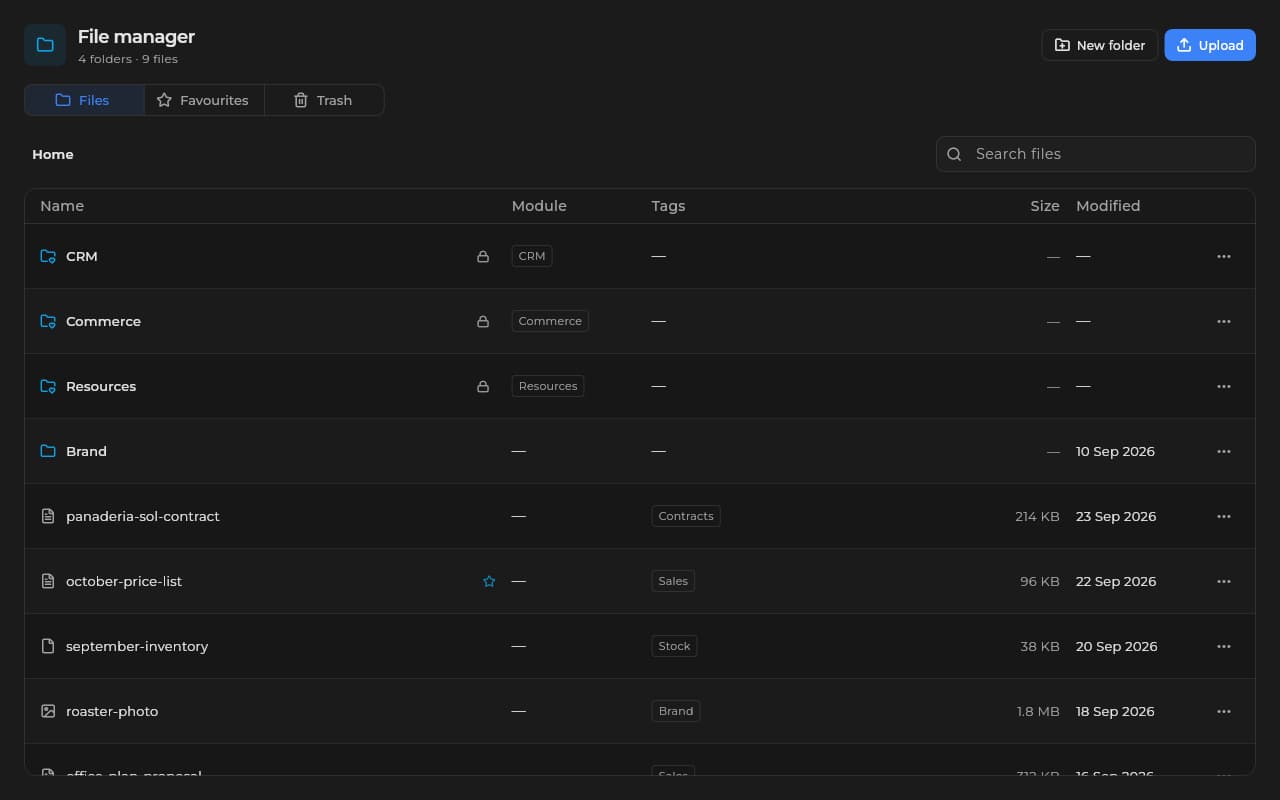
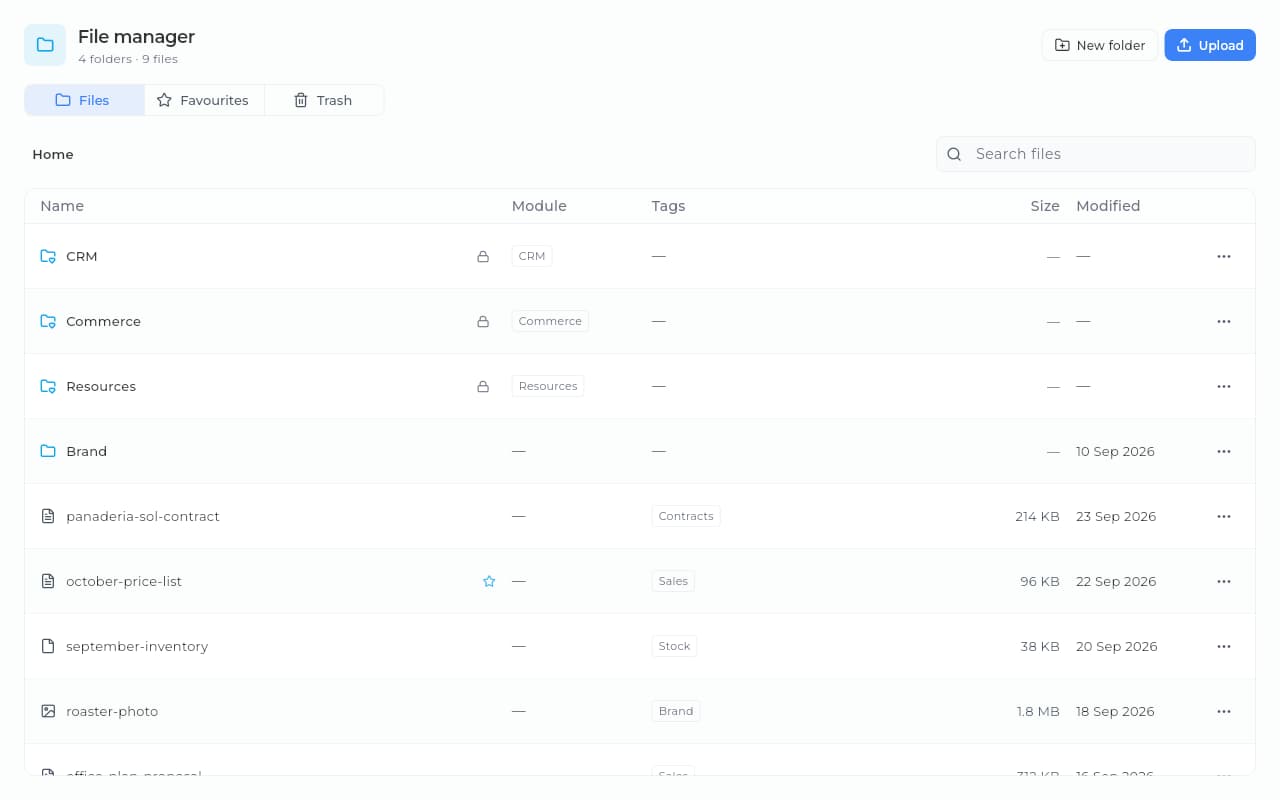
Sice file manager with each module's folders, contracts, price lists and images.Sice file manager with each module's folders, contracts, price lists and images.
Your files in one manager: a folder per module, your own folders, tags, favorites and a trash.
Sice · Workspace
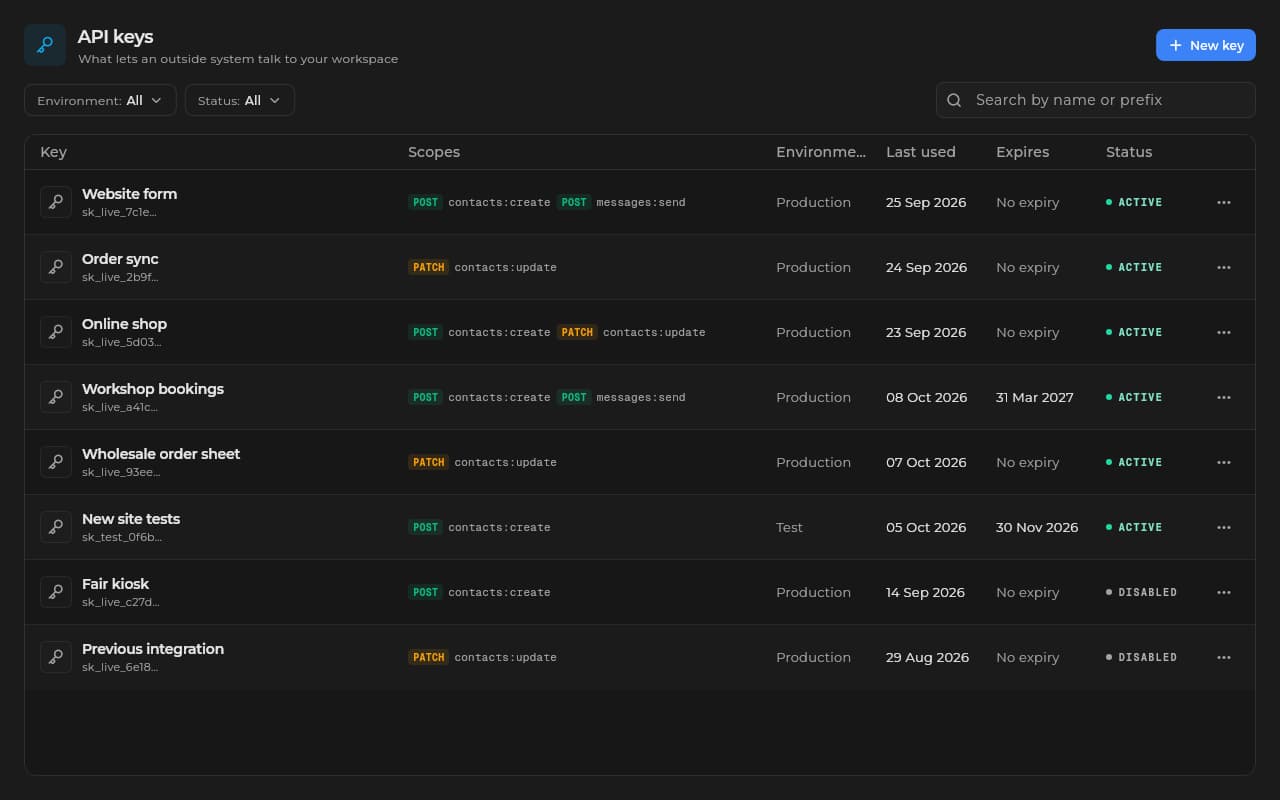
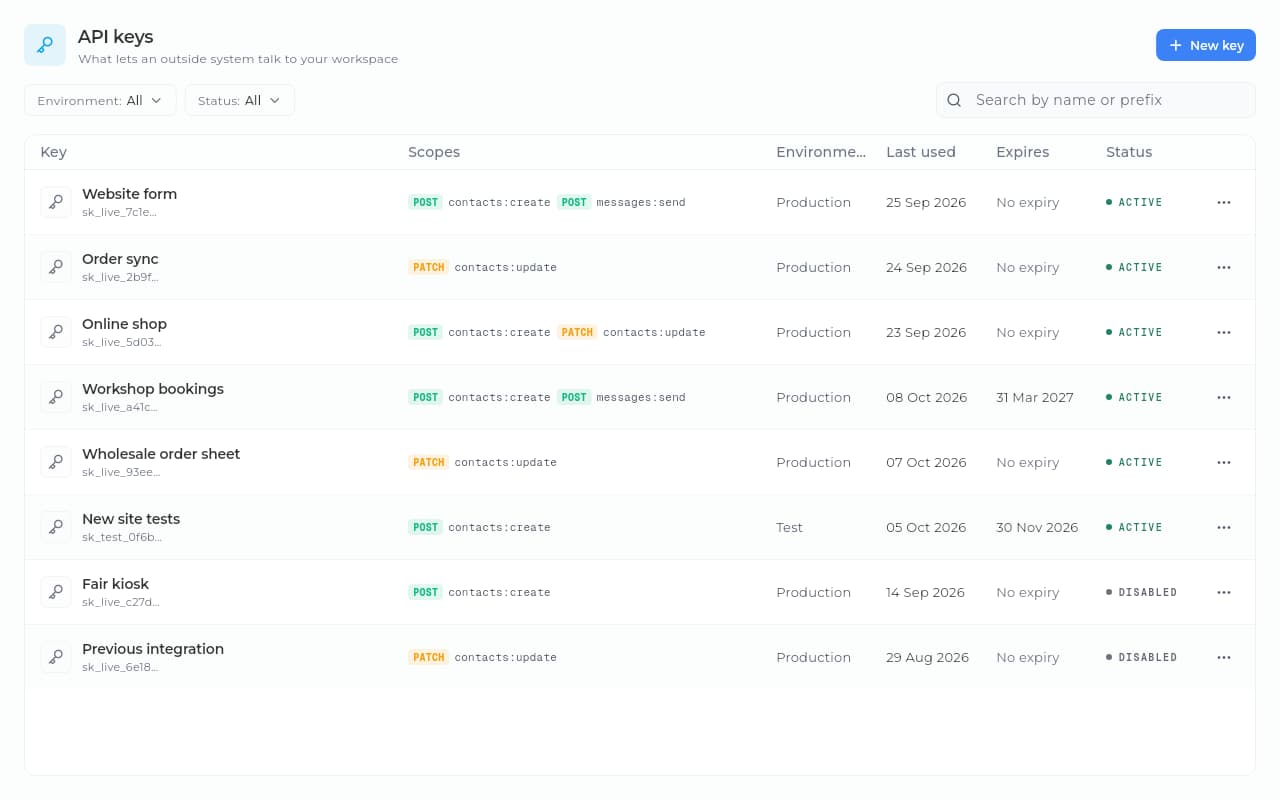
Sice API keys with their scopes, last use and status.Sice API keys with their scopes, last use and status.
And if you run your own systems, they talk to Sice with API keys, each with its own permissions.

Everything your workspace comes with.

Collaborators and roles
You invite each person by email with their role and tune their permissions by module and by action.
Notifications
You set up each notice one by one: who gets it, how it reaches them (bell, email, WhatsApp or push) and in what words, with a test send.
File manager
PDFs, images and contracts in folders, with search, favorites, a public link when you decide and a trash.
Connections
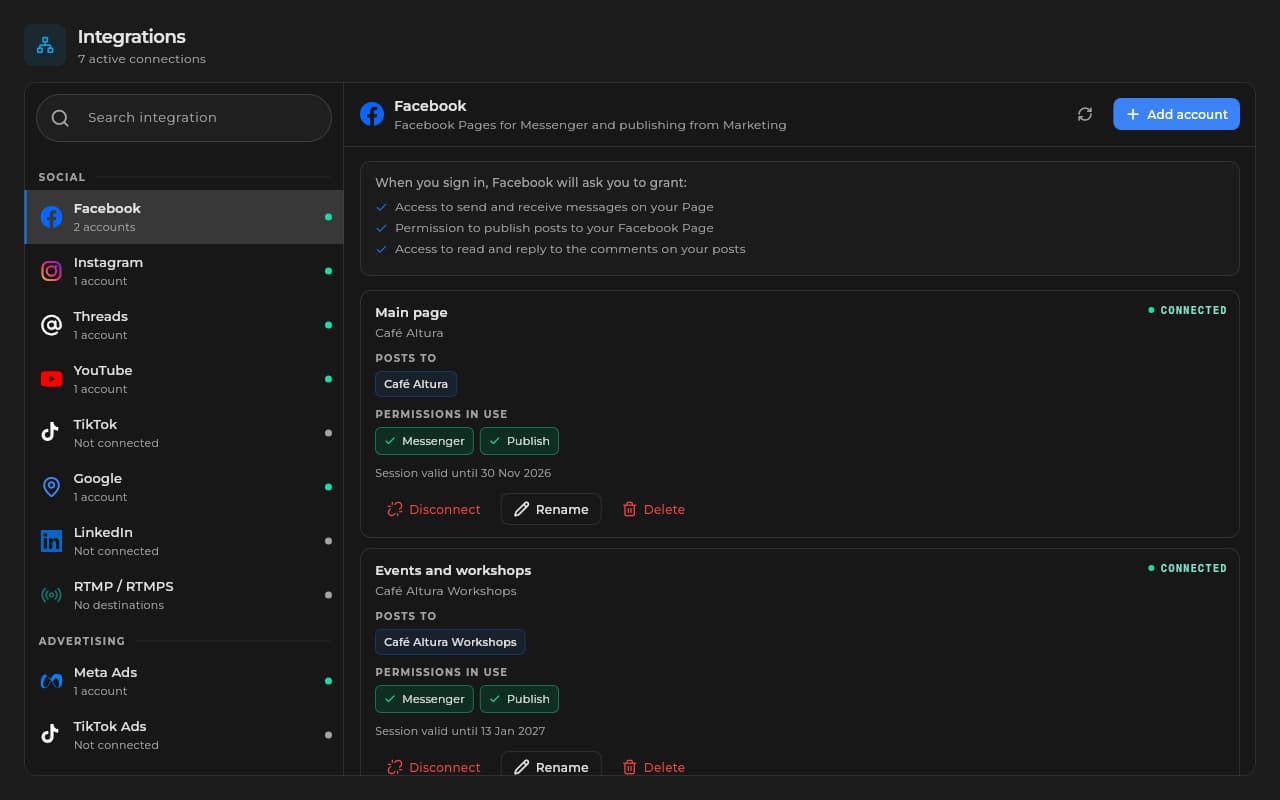
WhatsApp Business API, Facebook, Instagram, TikTok, YouTube, LinkedIn, your Google listing, Meta Ads, TikTok Ads and your email, with every credential encrypted.
A home that fits you
You pick and order indicators, quick actions, pending items, collaborators and modules; each person keeps their own layout in each workspace.
Modules and billing
You switch on the modules you need, see the month's usage, set a budget and top up your prepaid credit.
Sice · Workspace
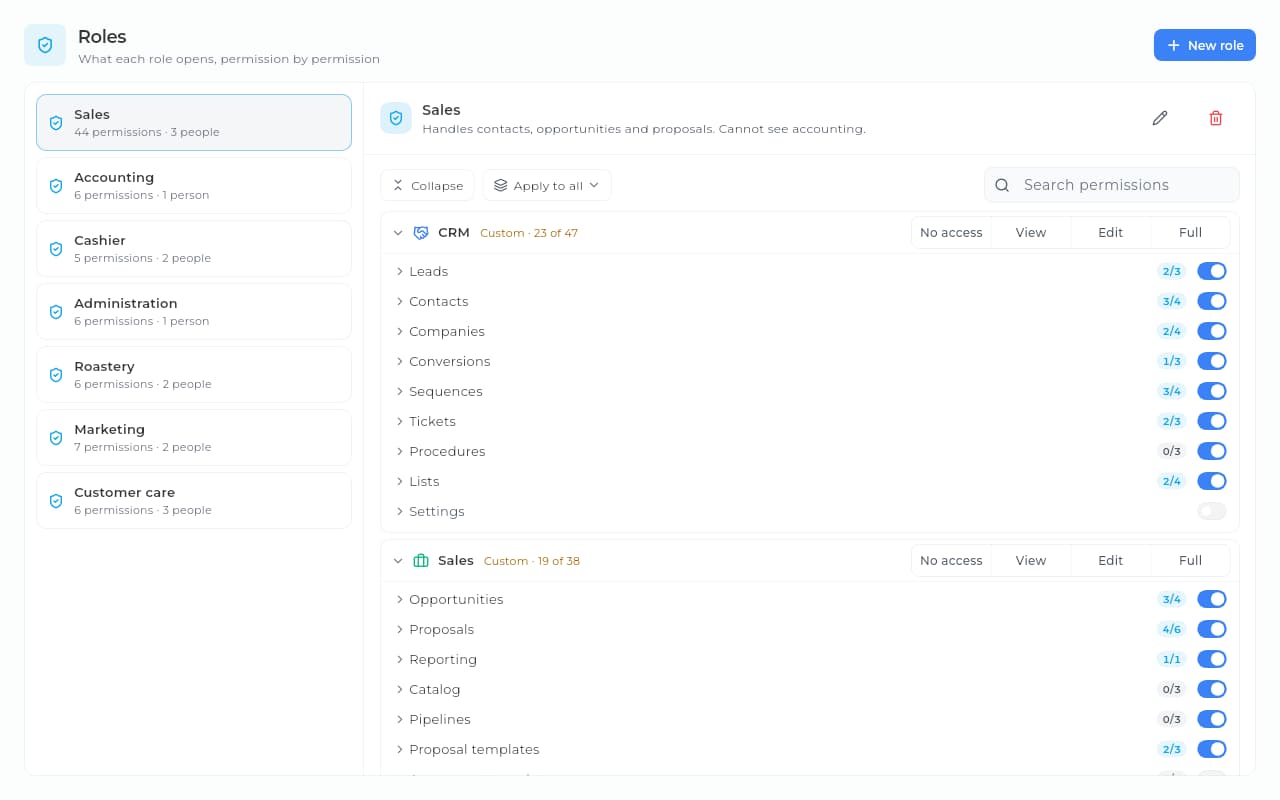
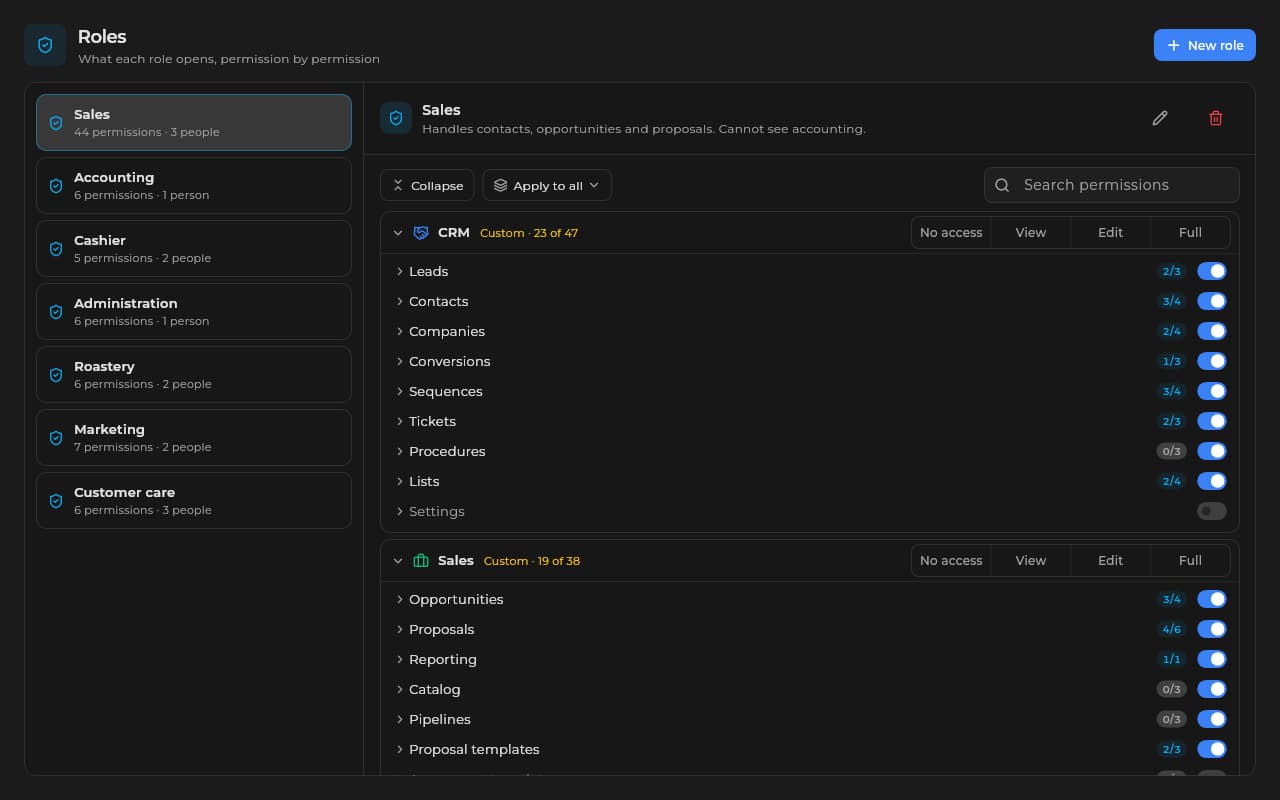
Sales role in Sice with its permissions by module and screen: CRM contacts, companies and tickets, and opportunities and proposals in Sales.Sales role in Sice with its permissions by module and screen: CRM contacts, companies and tickets, and opportunities and proposals in Sales.

You open the door for them, you do not hand over your key

You invite each person to your workspace with their role and tune their permissions by module and by action. The accountant gets into the books, the seller into sales, and nobody sees more. With the structure and the teams you organize your people and route the notices.

  • Collaborators invited by email
  • Reusable roles you create to fit you
  • Permissions by module and by action
  • You suspend without deleting: the history stays
  • Your people's structure and teams
Sice · Workspace
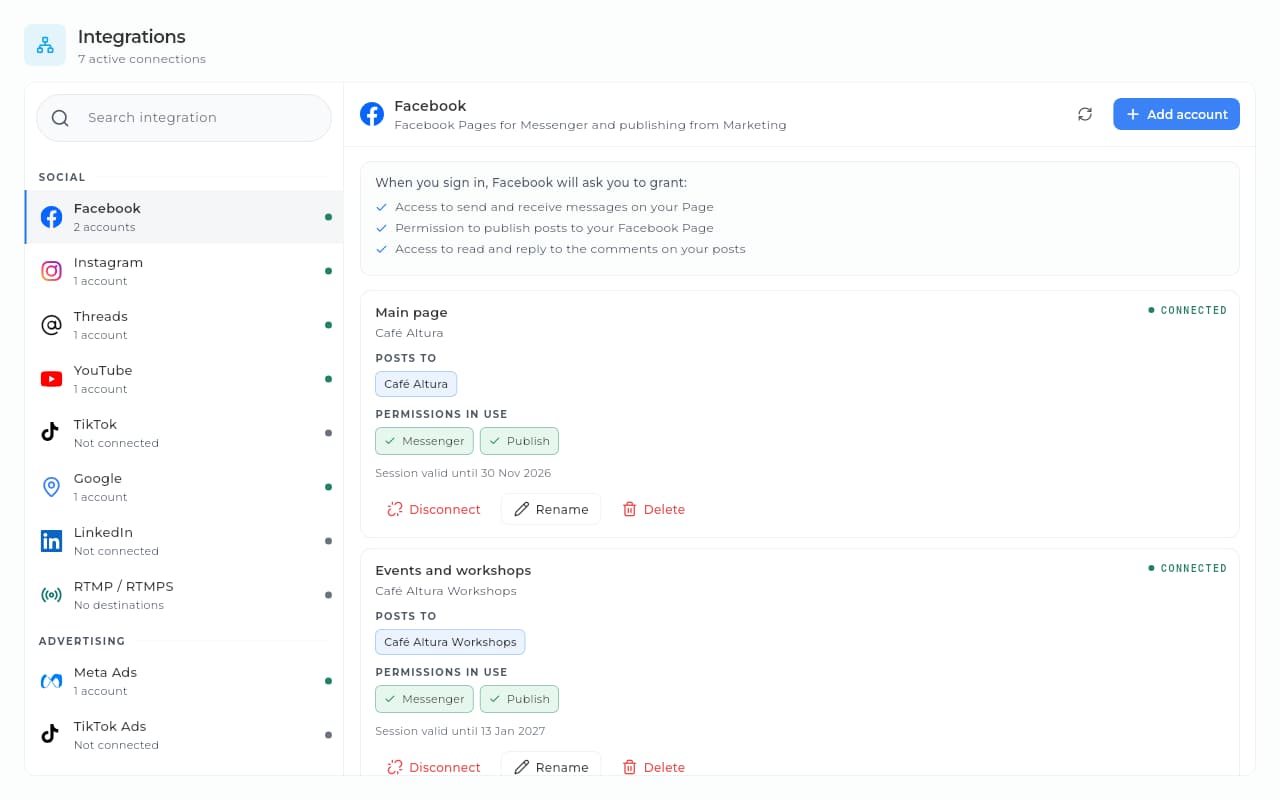
Sice integrations with Facebook connected, its Messenger and publishing permissions, and the list of networks and channels.Sice integrations with Facebook connected, its Messenger and publishing permissions, and the list of networks and channels.

Connected with what you already use

Your workspace connects your WhatsApp, your social networks, Meta Ads, TikTok Ads and the mailboxes you already use, and creates its API keys. Every credential is stored encrypted with your workspace's own key. Your domains, with SSL, connect from Websites.

  • The official WhatsApp Business API
  • Facebook, Instagram, TikTok, YouTube and LinkedIn
  • Meta Ads and TikTok Ads
  • Gmail, Outlook or your own domain's mailbox
  • API keys with narrow permissions and a webhook per key

Every notice, to whoever it concerns

In Workspace › General › Notifications each notice says what sets it off, who gets it (whoever handles the contact, the team, the owner, specific people or teams, or the client by email), through which channels and in what words. You try it with a test send and see its latest sends.

  • Whoever handles the contact or, if nobody does, your team
  • Bell, email, WhatsApp or push
  • The words of each notice, your way
  • A test send and the latest sends

Your day, in one place

Tasks, calendar, email and conversations, in My space or inside each workspace. You chat with and call your team, schedule meetings with a link, and people without an account join a meeting or an external conversation from that link, with the same call controls your team uses.

  • Agenda, tasks, calendar, email and chat
  • Calls and meetings with your team
  • Meetings with a link for guests
  • External conversations by link, no account needed

You pay for modules, nothing else

In Subscription you switch on the modules you need at the tier that fits, change plan or uninstall them whenever you want. You see what each one uses in the period, set a budget for the whole workspace or per module and, if you want, stop extra charges once you hit the cap. Usage-based services, such as WhatsApp templates, are paid from a separate prepaid credit.

  • Modules you switch on and off
  • Each module's usage in the period
  • A total or per-module budget, with a stop
  • Invoices filtered by status
  • Prepaid credit with a monthly cap per service

Made for these situations.

A growing team

You invite each person with their role the day they join, with no per-person charge.

Several brands or companies

Each one in its own workspace, with its database, its team and its connections; you switch between them in the app.

Notices to the right person

You choose which notice reaches whom (a person, a team or the owner) and through which channel.

Spending with a cap

A budget per module and a monthly cap per service on your credit: the end of the month brings no surprises.

How we help you set it up.

From signing up to a team at work, in an afternoon, not in a week.

  1. 1/3

    Step 1 · Guided setup

    We load your company and your team.

    We upload your legal name, logo and tax details, turn the roles you work with today into permissions in Sice and get each person's invitation ready.

    Setup at no extra cost

  2. 2/3

    Step 2 · Going live

    Your team comes in this afternoon.

    We send the invitations with their roles, switch on the modules you asked for and connect what matters: WhatsApp, your social networks and your email.

    No card to start

  3. 3/3

    Step 3 · Ongoing support

    If something gets stuck, someone is there.

    WhatsApp straight to support or a ticket from the app, whichever suits you better.

    An answer in under one business day

Frequently asked questions.

What we get asked most about the workspace, answered straight.

Still have a question? Let's talk

Is the workspace a module?

No. It is what you create when you start, with a database of its own, and every workspace has it: it is not switched on, not switched off and not charged. What you pay for are the modules you switch on under Workspace › Subscription › Modules.

Where is it in the app?

In the side menu, under Spaces, open Workspace: Workspace profile, Team, General, Connections, Administration and Subscription. The module store, billing and credit are in the browser and the desktop app; the Android app does not show them.

How much does it cost to invite my team?

Nothing: Sice does not charge per person. You invite from Workspace › Team › Collaborators, and each person comes in with the role you pick.

Can I have more than one workspace?

Yes. Each one has its own database, team, connections and modules, and is invoiced separately. You switch between them in the app.

Where do I choose who hears about what?

In Workspace › General › Notifications. Each notice says what sets it off, who gets it, through which channels and in what words, and you try it with a test send.

Where do I connect WhatsApp, my social networks and API keys?

In Workspace › Connections: Integrations and API keys. Every credential is stored encrypted with your workspace's own key.

How is it invoiced?

One monthly invoice with the modules you have switched on and their overage; the workspace adds nothing. Usage-based services, such as WhatsApp templates, are paid separately from prepaid credit, with a monthly cap per service if you want one.

Your workspace, ready from day one.

Create your free account with no card, set up your workspace, invite your team and switch on the modules you need. What each module costs is on Pricing.

Create a free accountSee pricing

Comes with every workspace · At no cost · No card
Sice
Sice

So your business sells more: visits through your website, every lead in your CRM with its follow-up, better service and leaner processes. You switch on only the modules you need.

contact@sice.site
+591 62134124

Solutions

  • Retail
  • Professional services
  • Health and wellness
  • See all

Modules

  • CRM
  • Websites
  • Sales
  • Marketing
  • Commerce
  • Automations
  • Accounting
  • Projects
  • Inventory
  • Human resources
  • Health
  • Resources
  • Management

Always included

  • Workspace

Platform

  • About Sice
  • Pricing
  • Install
  • Help center
  • Contact

Legal

  • Terms and conditions
  • Privacy policy
  • Cookie policy
  • Use of artificial intelligence
  • Data deletion

© 2026 Sice, a service of Crack S.R.L. (Santa Cruz de la Sierra, Bolivia). All rights reserved.

Hi 👋

How can we help?

Create a free account

Start today, no card

Visit the help center