Sice
Sice
ResourcesInstall
Sign inCreate a free account
  1. Home
  2. Automations

Agents and automations that work for you.

AI agents that answer your site's chat and work on tasks within the permissions you give them, automations that do the repeated work and a board where you follow and approve every task. AI runs on prepaid credit.

Ask about optionsSee pricing

Ask the team about the available options for this module.

Sice · Automations
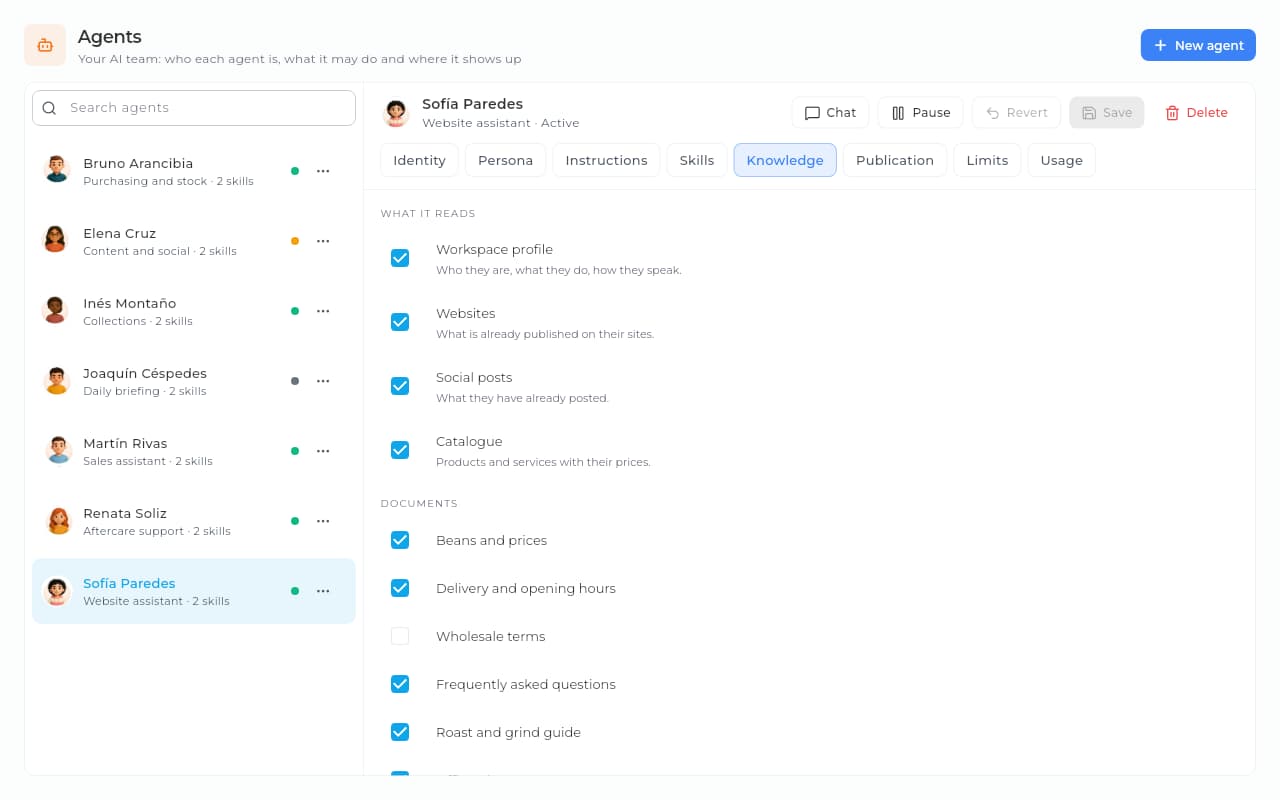
AI agents in Sice: the profile of Sofía Paredes, the website assistant, with her status, role, description and avatar.AI agents in Sice: the profile of Sofía Paredes, the website assistant, with her status, role, description and avatar.
Actual Sice screen · demonstration data
It answers your site's chat for you.
Every reply is paid from your prepaid credit, not with your team's hours.
The repeated work does itself.
On a schedule, on an event or by webhook, with the history of every run.
Every task, in sight.
Planned, approved, running, under review and done, on one board.

Your agents, with clear rules.

Sice · Automations
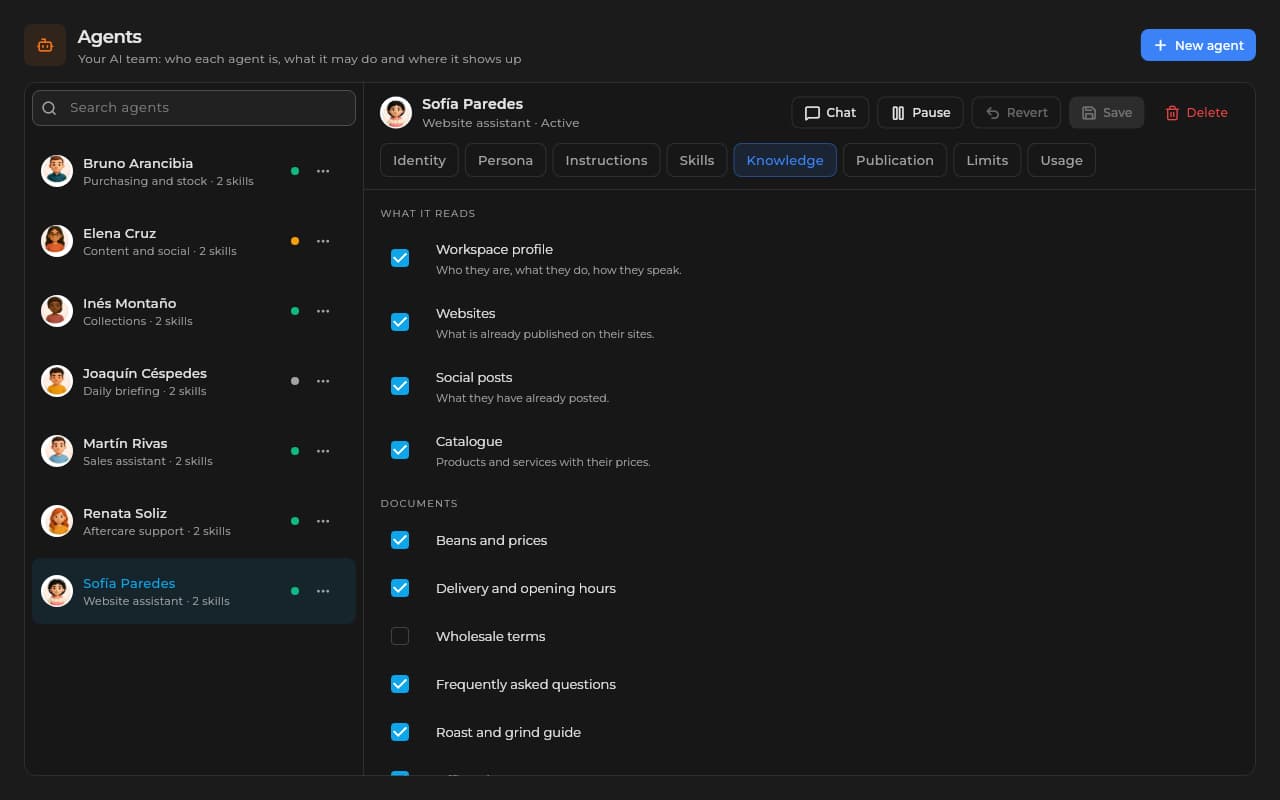
An agent's Knowledge tab in Sice: the sources it reads and the company documents assigned to it.An agent's Knowledge tab in Sice: the sources it reads and the company documents assigned to it.
You choose what each agent reads: your workspace profile, your sites, your catalog and the documents you give it.
Sice · Automations
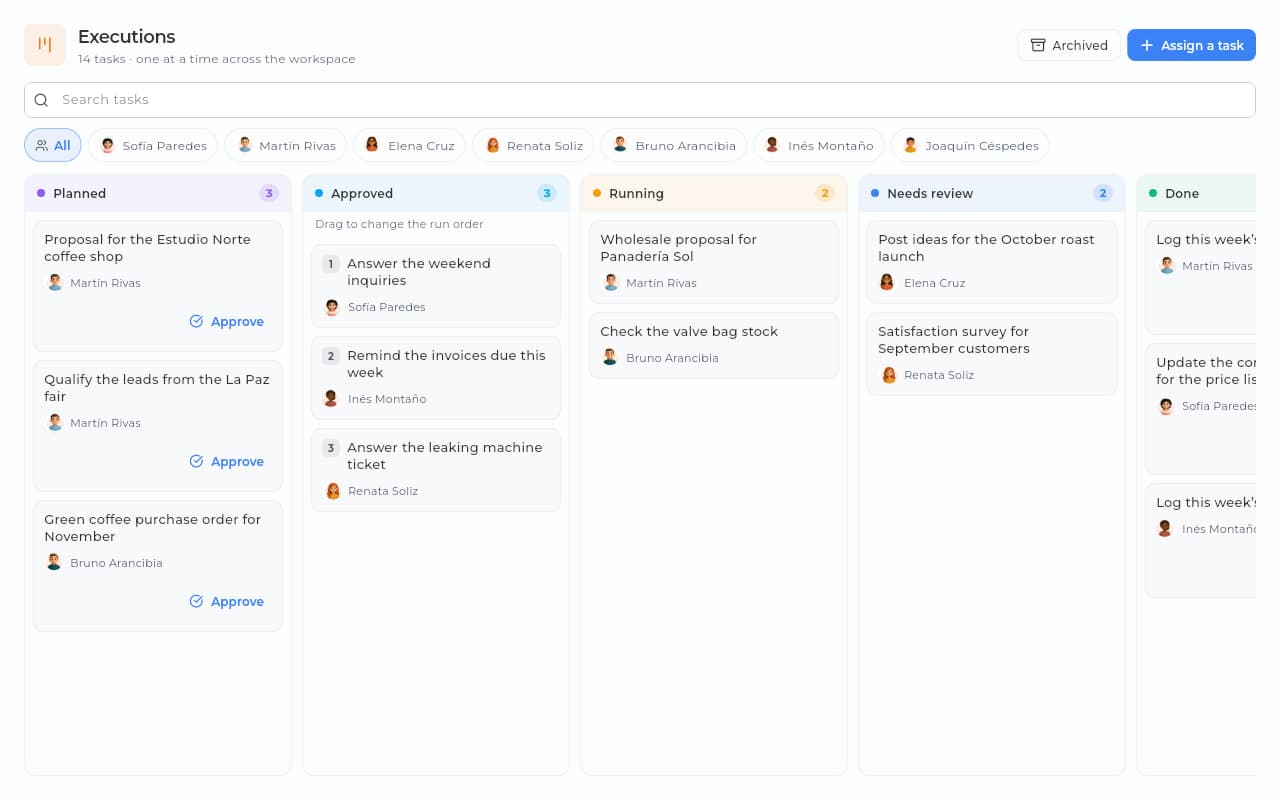
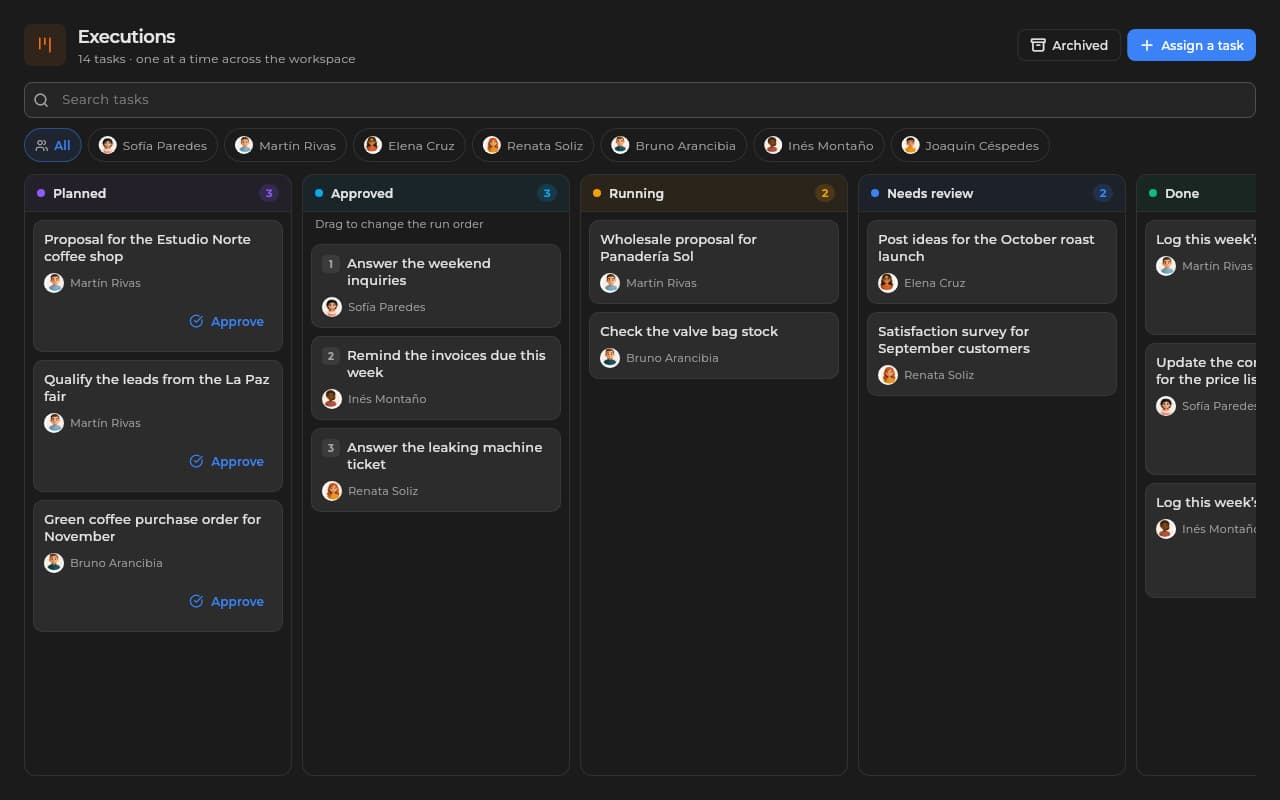
Sice executions board with each agent's tasks by column: planned, approved, running, needs review and done.Sice executions board with each agent's tasks by column: planned, approved, running, needs review and done.
The tasks you assign move across a board, from planned to done, with your review in between.

Everything this module carries.

Automations
You pick a trigger and add steps with «+»: a templated email, a note, a team notice, a task, AI or a Yes/No route.
Web and API
It answers in Spanish or in English in the chat of a site published with Websites and over the API.
Prices in the chat
With Sales switched on, it shows your catalog and its prices as cards in the conversation.
Executions
You assign tasks to your agents and follow them on a board: you approve what is planned and review what is done.
It saves the lead
With the CRM switched on, it notes the visitor's name, email and phone as a lead.
Handover to a human
You answer from the CRM and the agent steps aside; it resumes 30 minutes after your last message.

It speaks in your tone, and by your rules

You give it a tone, an audience, a goal and rules, and you choose what it reads: your workspace profile, your sites, your posts, your catalog and your company documents.

  • Company documents as a source
  • A tone you set
  • A personality you set
  • It reads the CRM inside Sice, if you give it permission

It does not just answer: it works

Inside Sice it works on tasks within the permissions you give it: it creates and scores contacts, logs activities, puts proposals together as drafts and schedules events. Every change it makes in your modules waits for your confirmation, except the actions you authorize; you set limits per turn and see how much it spends.

  • Contacts and activities in the CRM
  • Draft proposals in Sales
  • Events on your calendar and emails from the connected account
  • It publishes and schedules your posts, and works on campaigns and audiences
  • It checks stock and sales, and generates images

It calls you when you are needed

When the visitor asks for a person or the agent cannot solve it, it notifies whoever is on shift. With the CRM, the whole conversation stays on the contact's record; you answer from there and the agent steps aside while you do; it resumes 30 minutes after your last message.

  • A notice to whoever is on shift
  • A notice with the visitor's last message
  • The right person, by availability
  • The full conversation history

The repeated work, on a canvas

Automations on a visual canvas: pick the trigger (by hand, on a schedule, on an event —contact created, sale, web order— or by webhook) and add steps with «+»: a templated email, a note on the contact, a team notice, a task, AI or a Yes/No route; test them with «Run once» and see the history.

  • By hand, on a schedule, on an event or by webhook
  • A templated email, a note, a notice, a task or AI
  • Yes/No routes on the same canvas
  • «Run once» to test, and a history of every run

Every task, in sight

In Automations › Executions you assign tasks to your agents and follow them on a board: planned, approved, running, under review and done. You approve what is planned before it runs, review the result before calling it done and archive what is finished to clear the board.

  • A board by status, with a filter per agent
  • Approval before it runs
  • A review of the result
  • An agent can create tasks for another, if you allow it
  • Finished tasks are archived and restored

Made for these situations.

Customer service

An agent answers frequent questions on your site with what it knows about your business.

B2B leads from your site

With the CRM, every visitor who writes in the chat becomes a lead, with their score.

A summary every week

Every Monday an automation reads your open deals, AI summarizes them and your team gets the notice.

Tasks for your agents

You ask them for draft proposals or post ideas and approve them on the board before using them.

How we help you set it up.

An agent with your tone and your rules answering on your site, and your first automations running.

  1. 1/3

    Step 1 · Guided setup

    We give the agent what it needs to know.

    You write your frequent questions and materials as company documents and choose what it reads. We set the tone, the personality and who takes the handovers with you in one session.

    Setup included in the onboarding

  2. 2/3

    Step 2 · Going live

    You put the agent live on your site.

    We switch the chat on in your site published with Websites, or you connect it over the API, and we get your first automations running. With the CRM, the agent saves the lead and you hear about it when it asks for a person.

    No card · AI runs on prepaid credit

  3. 3/3

    Step 3 · Ongoing support

    We tune the agent with you.

    We go over real conversations and adjust its rules when it is needed. WhatsApp straight to support.

    An answer in under one business day

Frequently asked questions.

What we get asked most about this module, answered straight.

Still have a question? Let's talk

Which channels does the agent answer on?

In the chat of a site you publish with Websites and over the API, in Spanish and in English; it does not answer WhatsApp or Instagram. Inside Sice it also works on tasks with your team.

Which other modules do I need?

To answer on your site, a site published with Websites. To save the lead, the handover and the conversation on the contact's record, the CRM. To show prices in the chat, Sales.

When does the agent call me in?

When the visitor asks to talk to a person or the agent cannot solve it. With the CRM switched on, it notifies whoever is on shift and the conversation stays on the contact's record.

What if the agent gets it wrong?

You answer from the CRM and the agent steps aside while you do; it resumes 30 minutes after your last message. You adjust its rules so it does not happen again.

What starts an automation?

You, by hand; a schedule; an event in your modules, such as a contact created, a sale or a web order; or a webhook. You test it with «Run once» and see the history of every run.

How much does it cost for the agent to answer?

Every reply is charged to your prepaid credit and, with no balance, the agent does not answer; you can set a monthly cap. How many agents each tier of the module includes is on Pricing.

Where do I follow what my agents do?

In Automations › Executions: every task moves across a board from planned to done, and you approve or review it along the way. Each agent also shows how much it uses.

Put your first agent to work.

Switch Automations on, set up an agent with your tone and your rules, and build your first automation. What each tier includes is on Pricing.

Ask about optionsSee pricing

Ask the team about the available options for this module.

Sice
Sice

So your business sells more: visits through your website, every lead in your CRM with its follow-up, better service and leaner processes. You switch on only the modules you need.

contact@sice.site
+591 62134124

Solutions

  • Retail
  • Professional services
  • Health and wellness
  • See all

Modules

  • CRM
  • Websites
  • Sales
  • Marketing
  • Commerce
  • Automations
  • Accounting
  • Projects
  • Inventory
  • Human resources
  • Health
  • Resources
  • Management

Always included

  • Workspace

Platform

  • About Sice
  • Pricing
  • Install
  • Help center
  • Contact

Legal

  • Terms and conditions
  • Privacy policy
  • Cookie policy
  • Use of artificial intelligence
  • Data deletion

© 2026 Sice, a service of Crack S.R.L. (Santa Cruz de la Sierra, Bolivia). All rights reserved.

Hi 👋

How can we help?

Create a free account

Start today, no card

Visit the help center