Sice
Sice
ResourcesInstall
Sign inCreate a free account
  1. Home
  2. Sales

Go out and find customers.

Prospect businesses on the map, log every visit with its next action and send proposals your customer accepts online. When they say yes, you turn it into an invoice or a project with one click.

Ask about optionsSee pricing

Ask the team about the available options for this module.

Sice · Sales
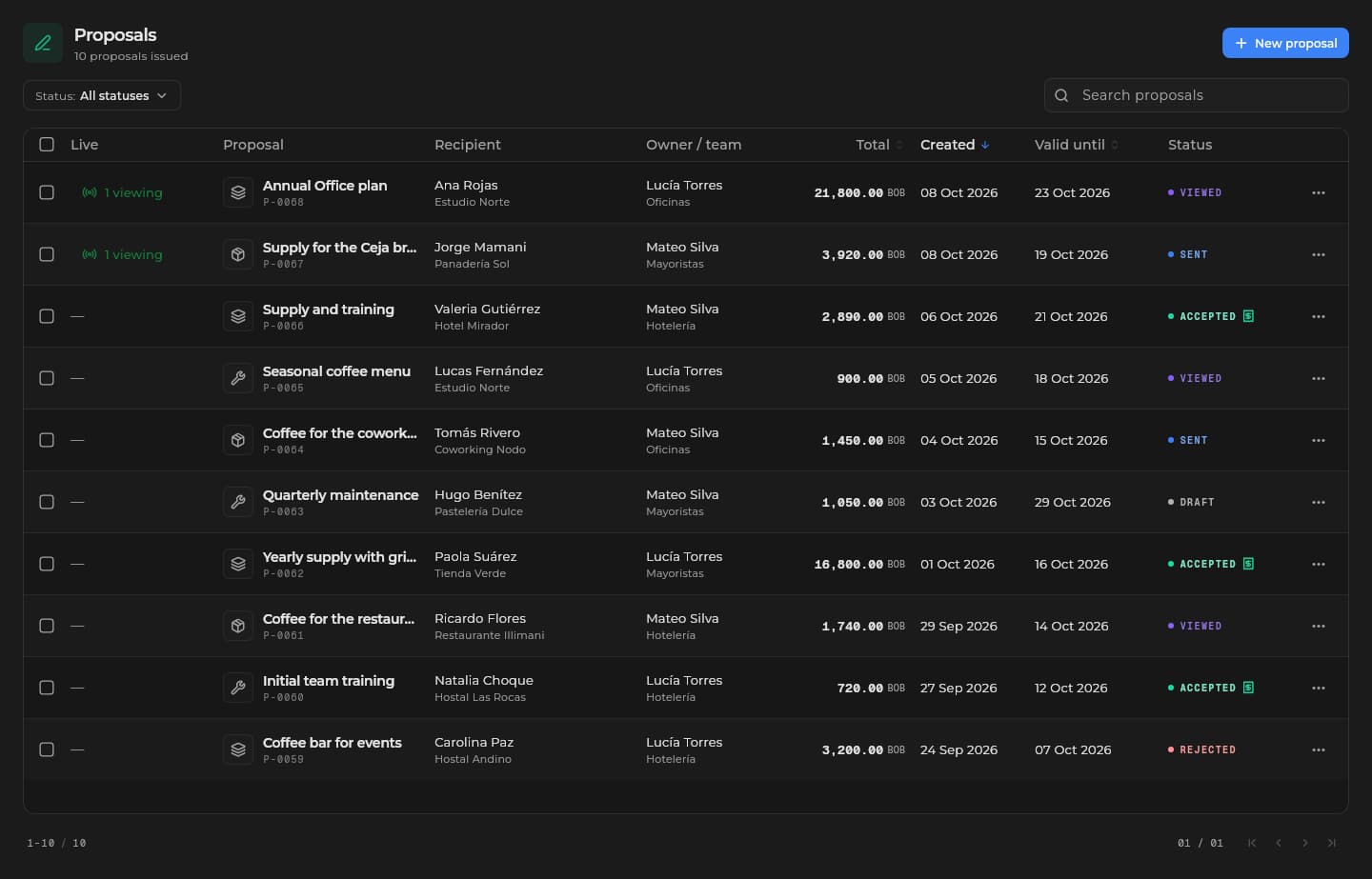
Proposals in Sice: accepted, viewed, sent, draft and rejected, with recipient, total and expiry.Proposals in Sice: accepted, viewed, sent, draft and rejected, with recipient, total and expiry.
Actual Sice screen · demonstration data
You go and find customers, you do not wait for them.
Businesses on the map, every visit with its next action.
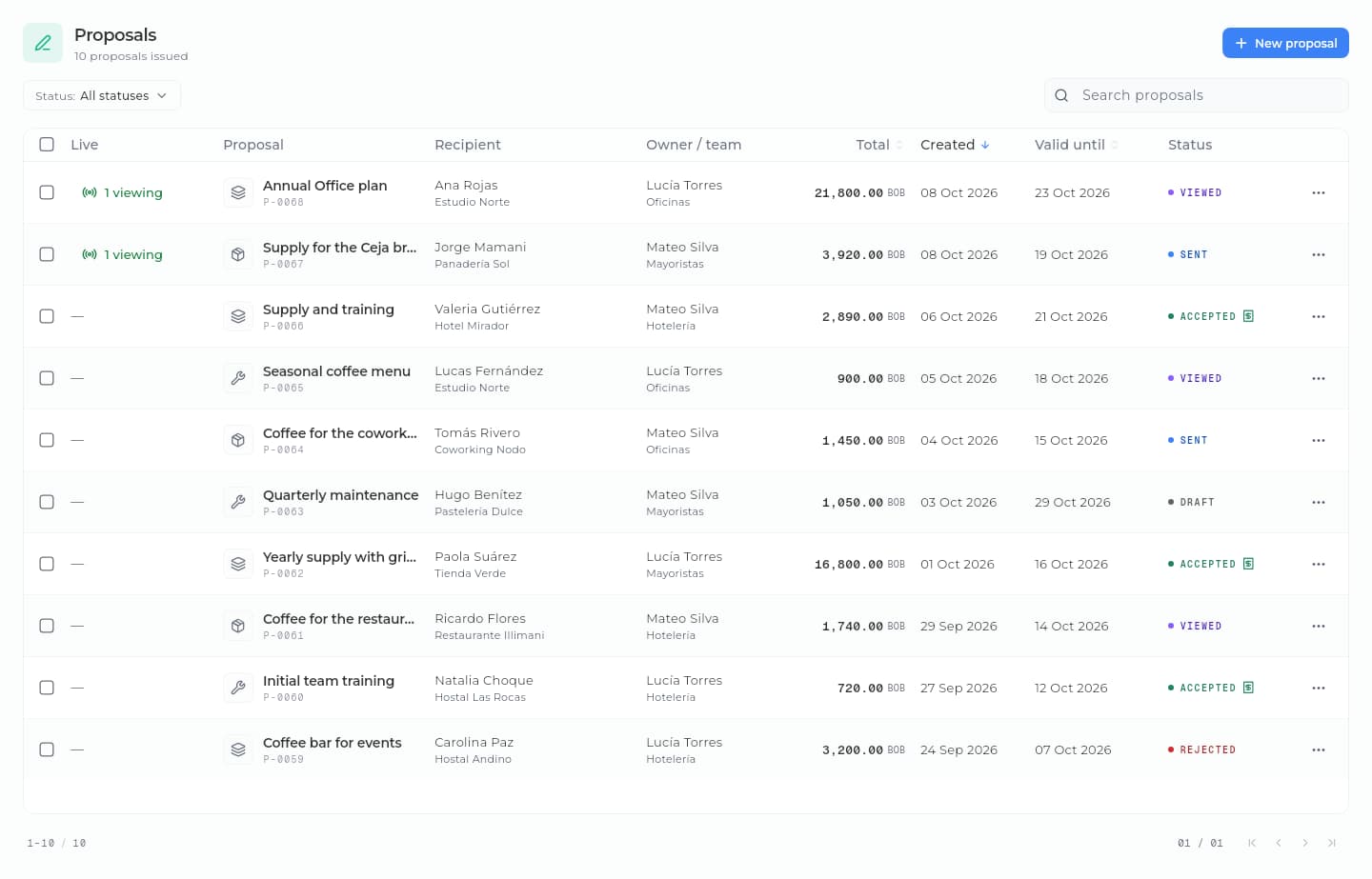
You know where every proposal stands.
Sent, viewed, accepted or rejected; you see live which section they read and get an instant notice when they answer.
The proposal is not left unanswered.
With the CRM, you enroll the customer in a sequence that writes to them until they answer.

From the conversation to the invoice, without losing the thread.

Sice · Sales
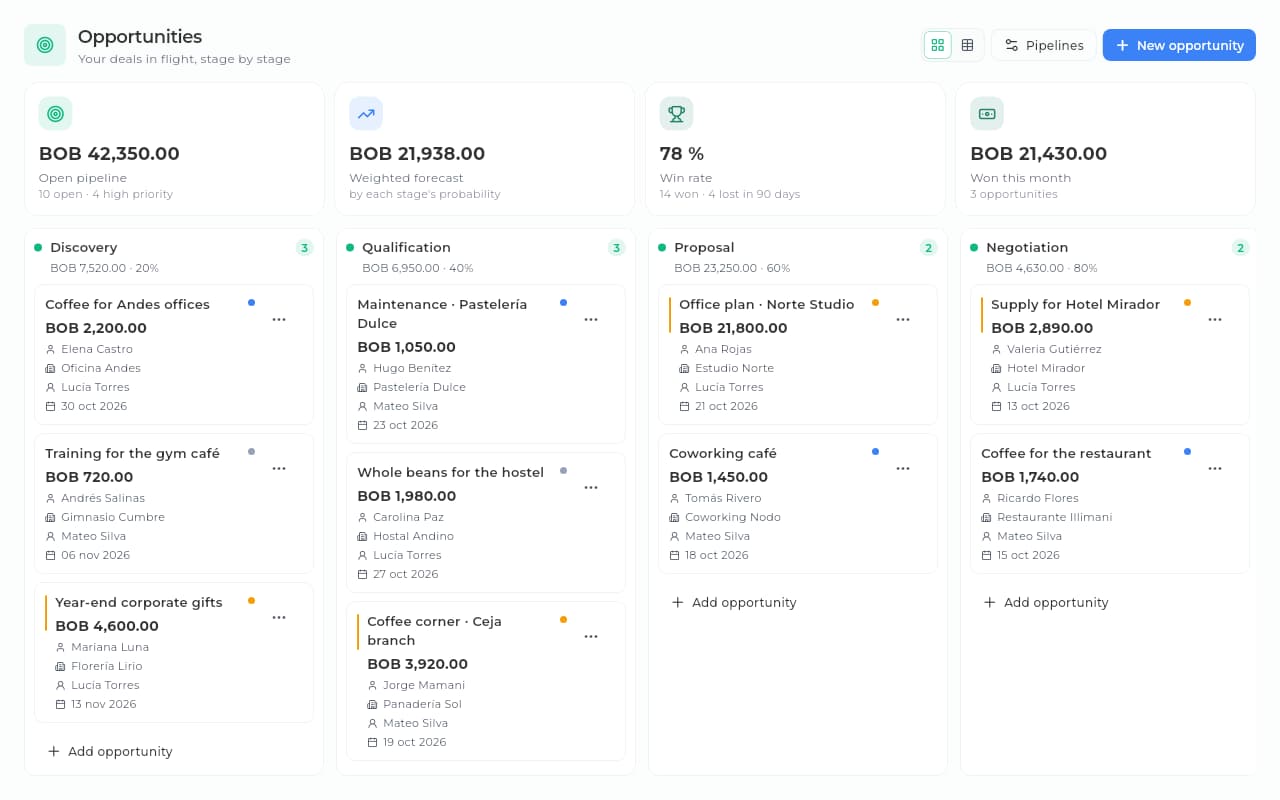
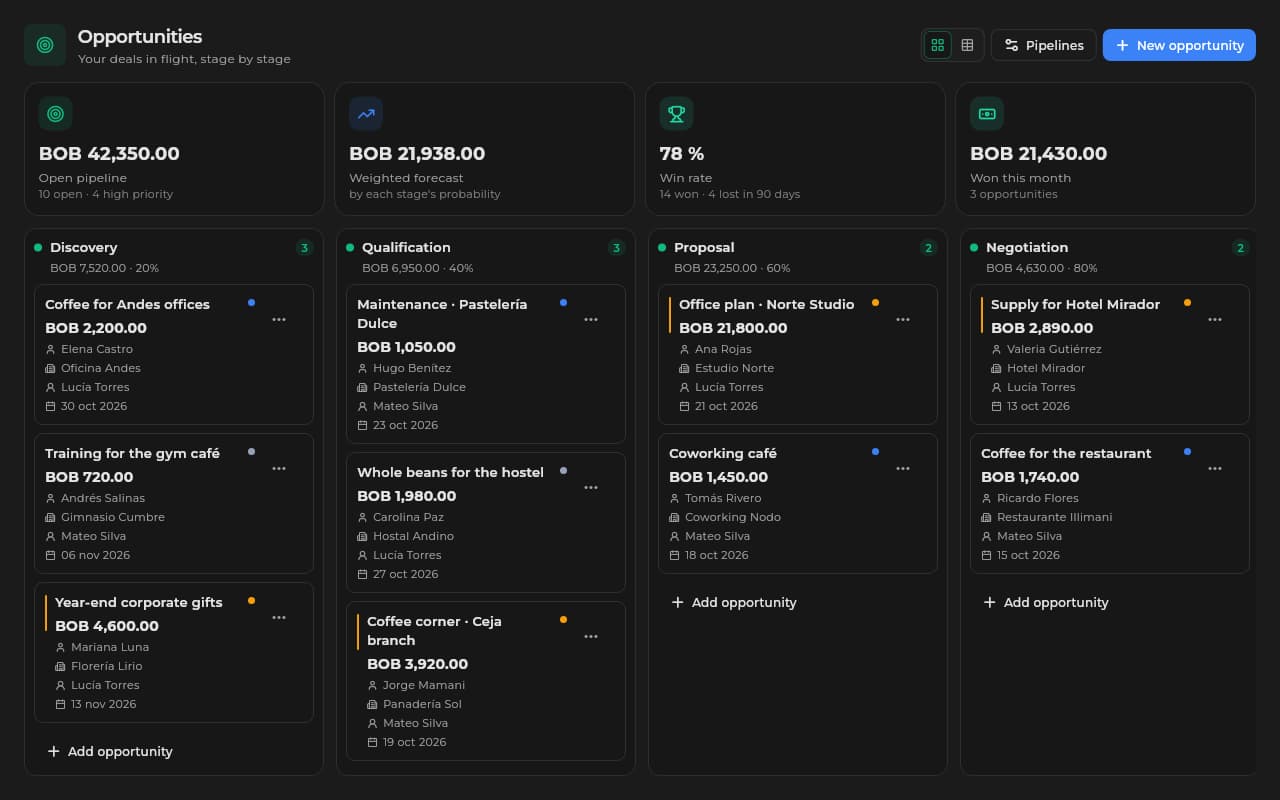
Opportunity pipeline in Sice by stage, with each deal's amount, the weighted forecast and the win rate.Opportunity pipeline in Sice by stage, with each deal's amount, the weighted forecast and the win rate.
Each opportunity moves through your pipeline's stages, with its amount and its owner.
Sice · Sales
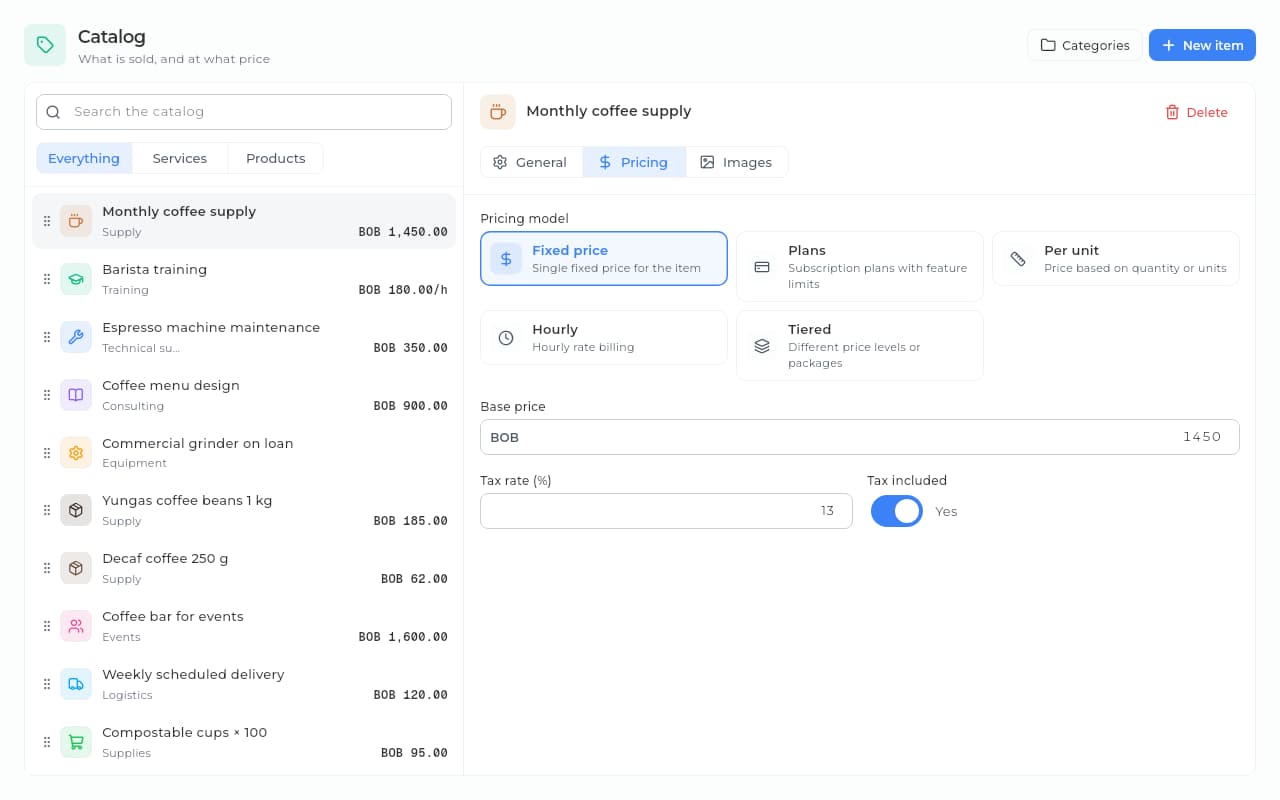
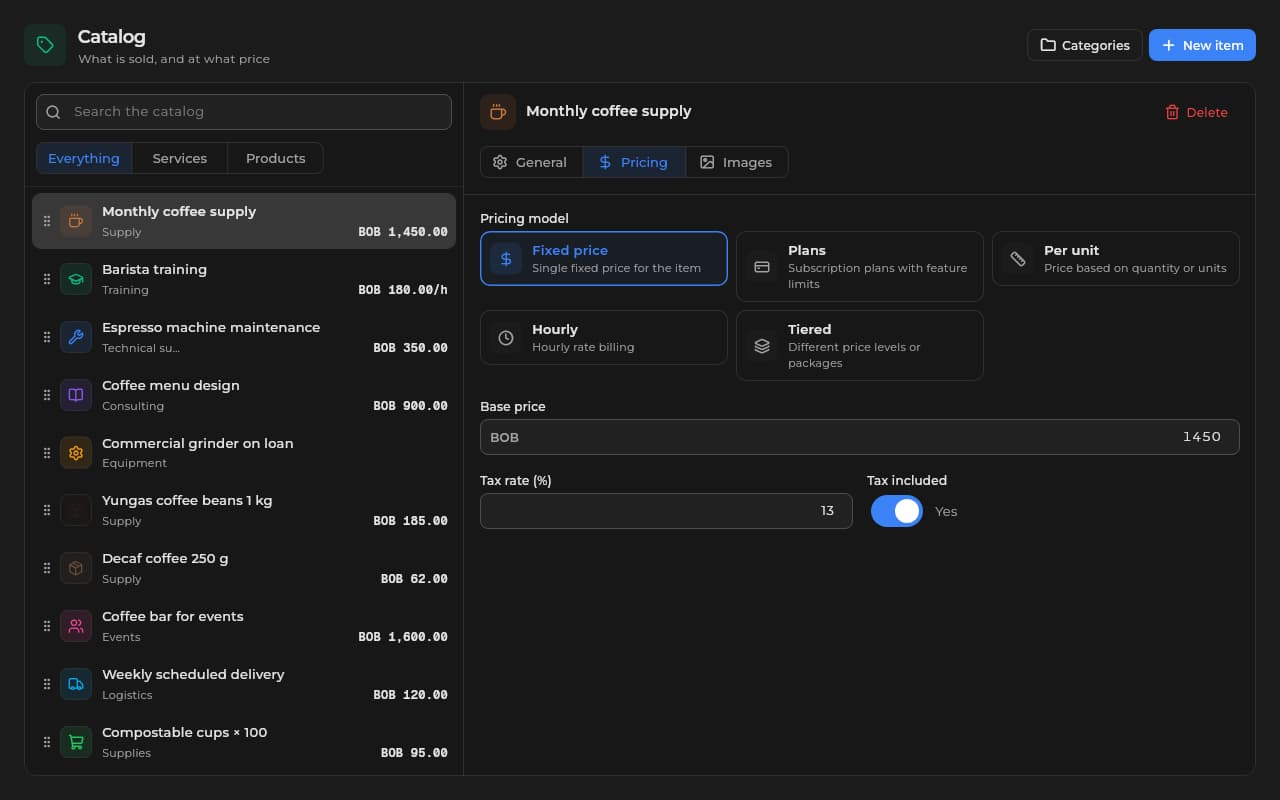
Sales catalog in Sice with a service open on its pricing tab: a fixed price with tax included.Sales catalog in Sice with a service open on its pricing tab: a fixed price with tax included.
You put the proposal together from your service catalog.
Sice · Sales
Proposals in Sice with recipient, owner and team, total, expiry and status.Proposals in Sice with recipient, owner and team, total, expiry and status.
You send it and follow its status: sent, viewed, accepted.
Sice · Sales
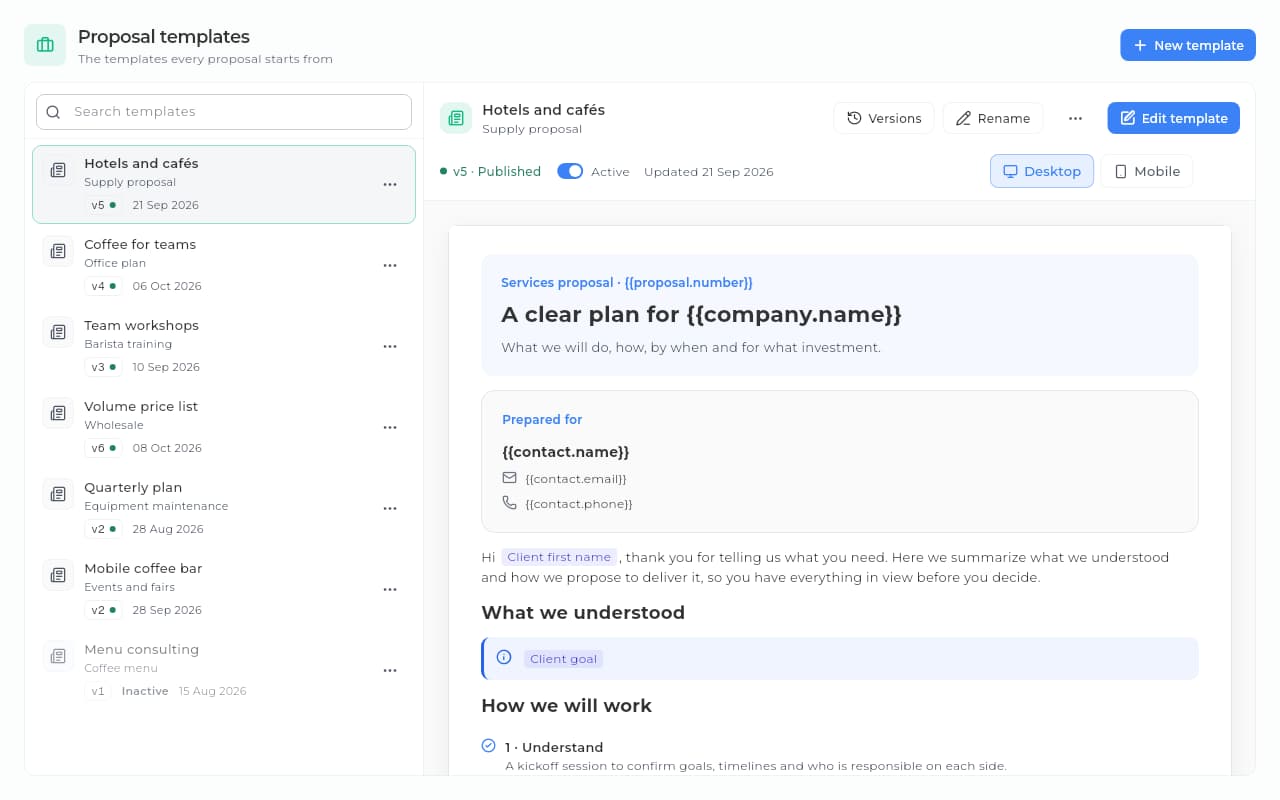
Proposal templates in Sice: the list with each published version and the preview of a catalog template.Proposal templates in Sice: the list with each published version and the preview of a catalog template.
And the next proposal comes from a template, in minutes.

Everything this module carries.

Proposals that close
Templates, catalog prices, online acceptance with an on-screen signature and, while your client reads it, chat or a video call without leaving the proposal.
Opportunities in motion
Stages with their probability and required fields; every opportunity with amount, owner and closing date.
Prospecting on the ground
Businesses on the map, visits with their outcome and the next action, which Sice reminds you of.
A service catalog
Your menu of services with prices, plans and discounts.
Zones for your team
You draw zones on the map (polygon or circle), assign them a team and targets, and turn all their places into doors.
Sales reports
A weighted monthly forecast, win rate, results per seller and lost reasons.
Sice · Sales
Proposal list in Sice: an accepted proposal already turned into a sale, next to others that were sent and viewed.Proposal list in Sice: an accepted proposal already turned into a sale, next to others that were sent and viewed.

When the customer accepts, you start with one click

You put the proposal together from the catalog and send it by email. The customer accepts it online, without creating an account, and the opportunity is won. With one click you create the project with a task per service, or the invoice with its ledger entry, which you record as paid or on credit.

  • Catalog services and your store's products
  • Online acceptance with an on-screen signature
  • A project with one click (with Projects)
  • One task for each service
Sice · Sales
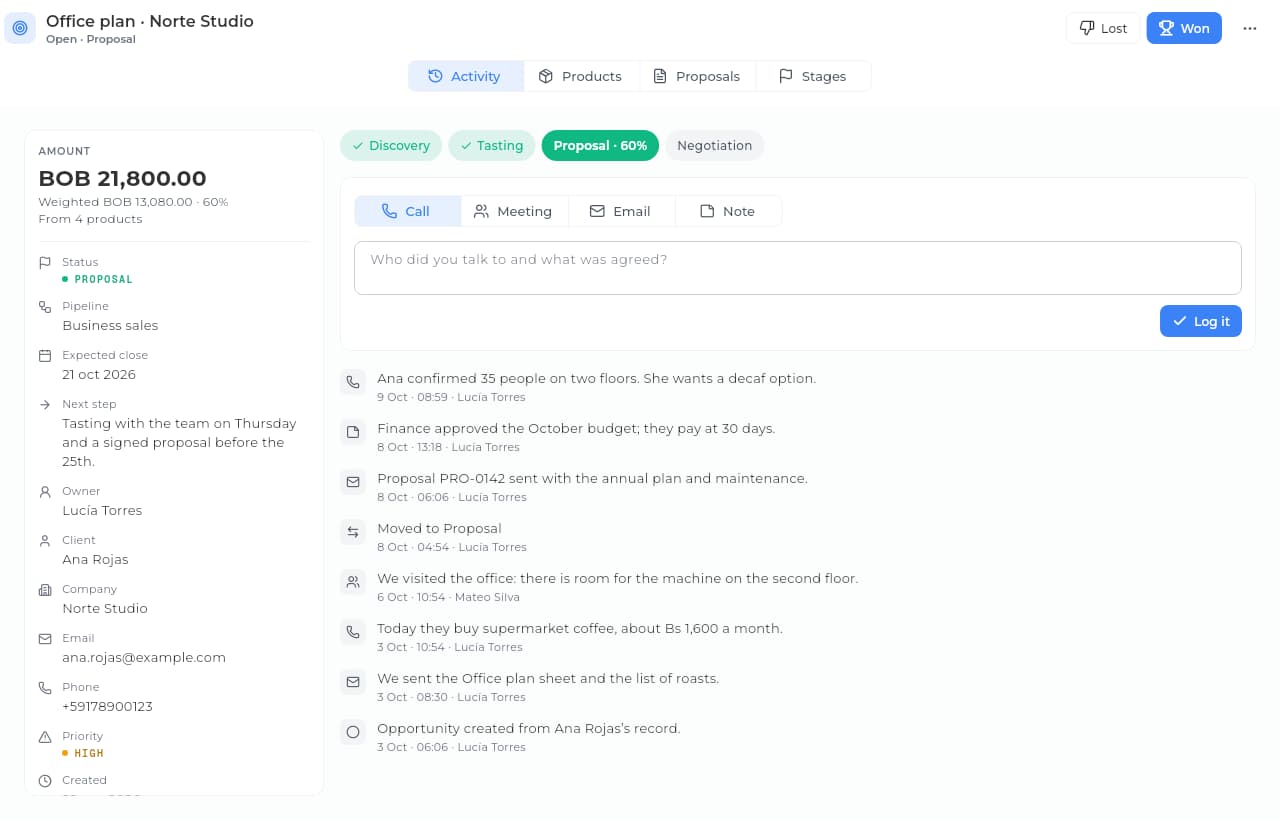
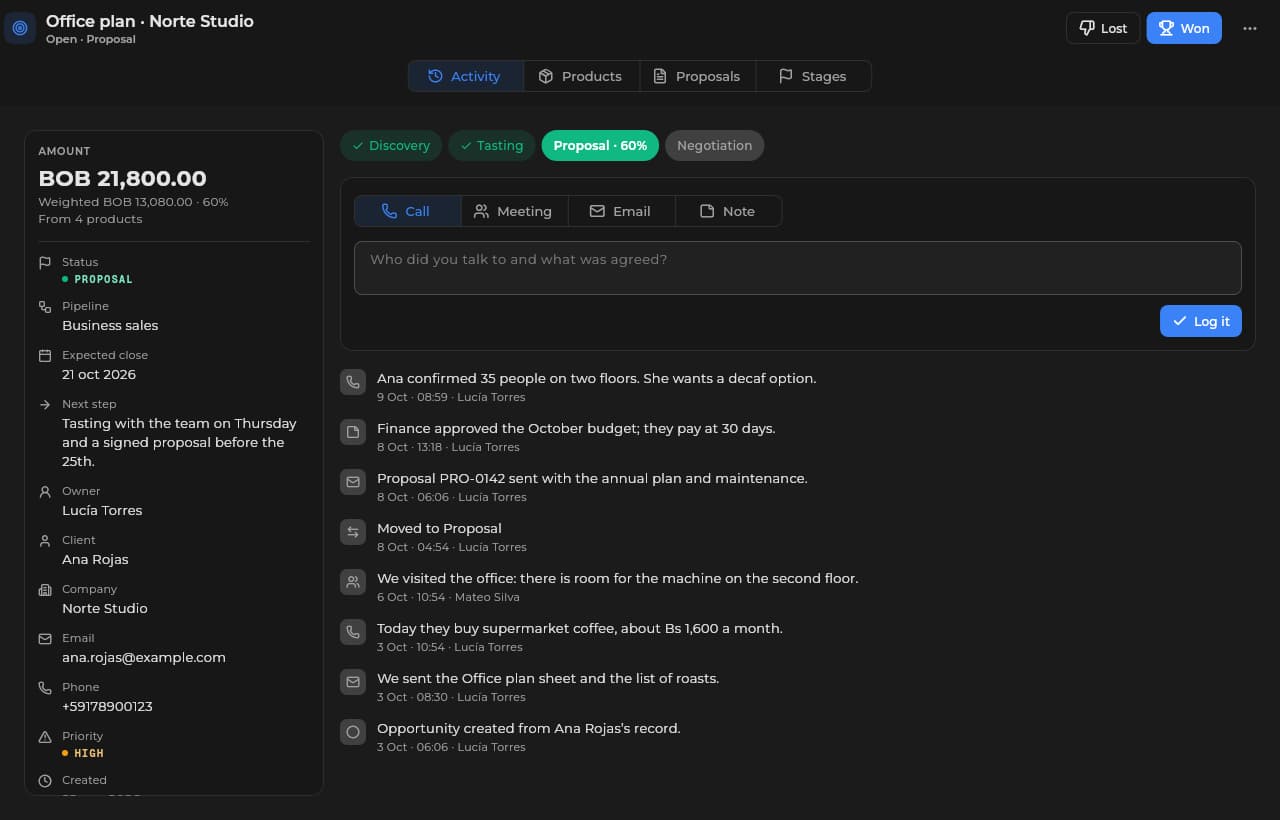
Opportunity in Sice with its amount, pipeline stage, owner, close date and activity log.Opportunity in Sice with its amount, pipeline stage, owner, close date and activity log.

Every opportunity, in its stage

You move each opportunity through the stages of your pipeline, with amount, owner and closing date. Each stage carries its probability and the fields it requires to move on. When you win it, its CRM contact becomes a customer.

  • Your own stages, with probability and required fields
  • Amount and closing date
  • An owner per opportunity
  • A history of stages

You stay with your client while they read

Sice lets you know when your client opens the proposal: you follow the section they are reading, chat with them and invite them to a video call that rings even with the chat closed. Each proposal has an owner and a team, and all of them hear when the client opens or answers it. Afterwards you see which sections they read and for how long.

  • Who is viewing it right now
  • Chat and video call from the proposal
  • An owner and a team on every proposal
  • Reading history by section
  • Amounts in another of your currencies, for reference
Sice · Sales
Proposal templates in Sice, each with its published version, and a preview of the selected one.Proposal templates in Sice, each with its published version, and a preview of the selected one.

Your best proposal, ready to repeat

You design your templates right on the page: type, insert blocks with «/» and variables with «{{», and publish versions you can restore. Or start from a ready-made catalog of proposals and agreements in Spanish or English, and your workspace gets its own copy. The next proposal comes out in minutes and keeps the version it was built from.

  • Proposal templates
  • Agreement templates
  • A catalog of ready-made templates
  • Proposal versions you can restore
  • Prices from the catalog

Made for these situations.

Creative agency

Proposals with images, online acceptance and a project with one click.

Law or accounting firm

Monthly plans in the catalog and proposals on the customer's record.

Consulting

Proposals by the hour or by plan, with versions and online acceptance.

Technical services

A catalog with clear prices and proposals that come out in minutes.

Not a silo. It talks to the rest of Sice.

Connect this module to the tools that complete your daily work.

  • CRM
  • Commerce
  • Accounting
  • Websites
  • Projects
  • Marketing
  • Management

How we help you get going.

From proposals in Word to a flow that follows itself.

  1. 1/3

    Step 1 · Guided setup

    We map your services and templates.

    We load your service catalog and its prices. We turn your best proposals into templates and store your contracts as agreement templates. We connect your email so you can send the proposals.

    Guidance at no extra cost

  2. 2/3

    Step 2 · Going live

    Your first proposal, today.

    We set up online acceptance and the conversion into an invoice or a project. We train the team in short sessions by role.

    No card · free allowance included

  3. 3/3

    Step 3 · Ongoing support

    A human when you need one.

    WhatsApp straight to support. We help you refine templates and catalog as the business grows.

    An answer in under one business day

Frequently asked questions.

What we get asked most about this module, answered straight.

Still have a question? Let's talk

How does it help me find new customers?

With prospecting: you look for businesses on the map by trade and by how to reach them, save them in lists, and the ones you decide to work become doors, with a status, an owner, visits and a next action. When a place becomes a door you get the owner's contact, which counts toward your Sales plan's monthly usage. From the door you call or message on WhatsApp with one tap, log each visit and Sice reminds you of the next action; a sale marks the opportunity as won and an interested business moves into your CRM with one click. Today the directory covers Bolivia; in other countries you add places by hand.

Can I split the territory across my team?

Yes. You draw zones on the map (polygon or circle), assign them a team and targets, and turn all their places into doors.

Does it handle projects with stages and deliverables?

With the Projects module: stages, milestones and deliverables. An accepted proposal becomes a project with one click.

How do I price my services?

Your catalog takes a fixed price, by the hour, by unit or by monthly plan. An accepted proposal is invoiced once.

Can I see the margin on each project?

With Projects: you load hours and costs, and the margin is calculated against the value of the accepted proposal.

Does it connect with my accounting?

Yes: when you convert an accepted proposal, its services are invoiced, you record it as paid or on credit and it is posted to the books, with no Excel.

What are agreement templates?

Your contracts kept in Sales as templates, at hand so nobody drafts them from scratch; write them yourself or start from the catalog (services, confidentiality, work order). Sice stores them; it does not send them to the customer.

Can the customer accept online?

Yes: they verify their email, type their name, sign on screen and accept. The date, the IP and the browser are recorded; the signature records that they accepted, but it is not a legal signature and it does not take the payment. On acceptance the opportunity is won and you get the notice right away.

Go out and find your next sale.

Start free; what each tier includes is on Pricing. Your first logged visit or your first proposal, this very afternoon.

Ask about optionsSee pricing

Ask the team about the available options for this module.

Sice
Sice

So your business sells more: visits through your website, every lead in your CRM with its follow-up, better service and leaner processes. You switch on only the modules you need.

contact@sice.site
+591 62134124

Solutions

  • Retail
  • Professional services
  • Health and wellness
  • See all

Modules

  • CRM
  • Websites
  • Sales
  • Marketing
  • Commerce
  • Automations
  • Accounting
  • Projects
  • Inventory
  • Human resources
  • Health
  • Resources
  • Management

Always included

  • Workspace

Platform

  • About Sice
  • Pricing
  • Install
  • Help center
  • Contact

Legal

  • Terms and conditions
  • Privacy policy
  • Cookie policy
  • Use of artificial intelligence
  • Data deletion

© 2026 Sice, a service of Crack S.R.L. (Santa Cruz de la Sierra, Bolivia). All rights reserved.

Hi 👋

How can we help?

Create a free account

Start today, no card

Visit the help center